
Shopify says one number and your export says another.
If you've ever tried to reconcile Shopify sales at the end of the month, you've probably seen this happen. Shopify Analytics gives you one total, the order export gives you another, and neither looks obviously wrong. So you start digging. Maybe it's shipping, maybe refunds, maybe taxes or discounts. You tweak the date range, export another CSV, compare a different report, and an hour later you're still trying to explain why the numbers don't line up.
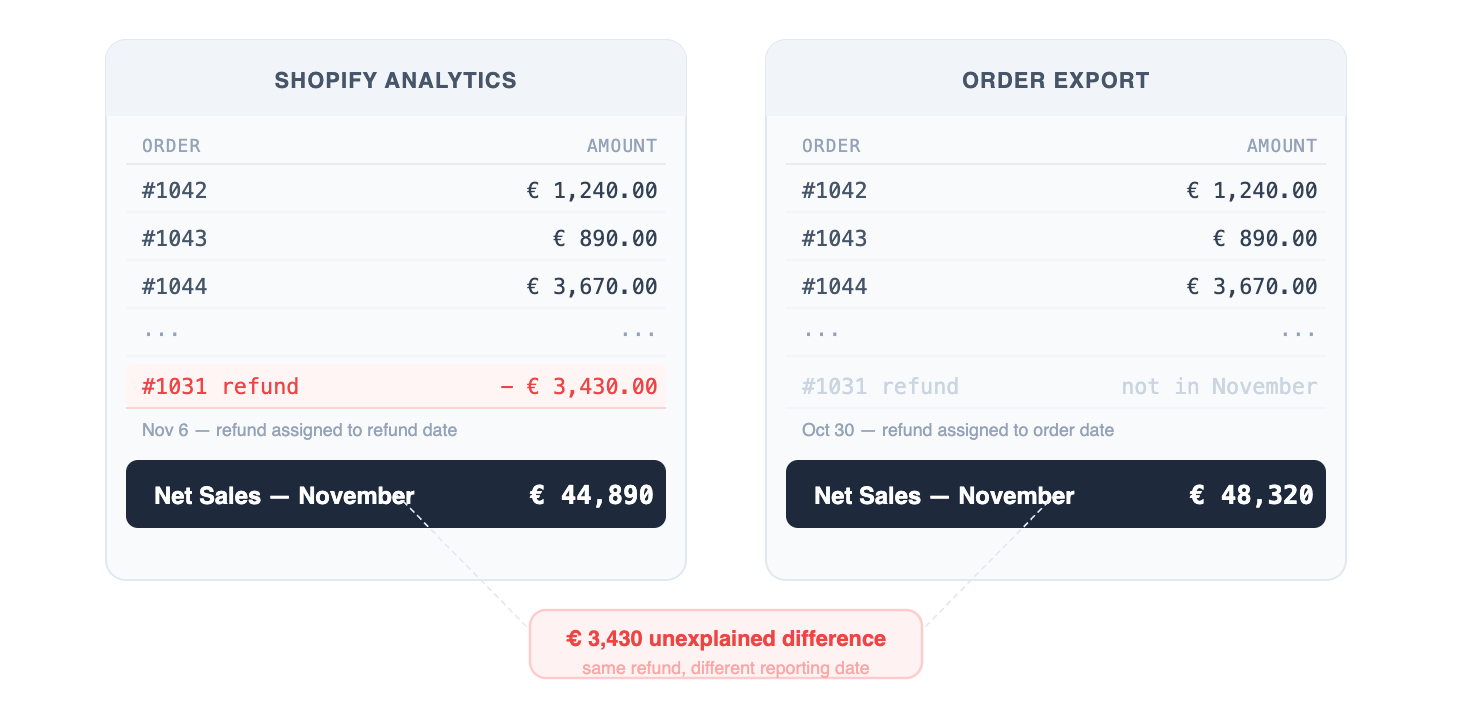
The data isn't missing. The reports are simply answering different questions.
Shopify Analytics was built to help merchants understand how their store is performing. It's great for tracking sales trends, conversion rates, average order value or marketing performance. Finance, however, looks at the same transactions through a different lens. They're trying to close the books, recognize revenue correctly and explain every figure on a financial statement. Those aren't the same objectives, so it's not surprising that the numbers don't always match.
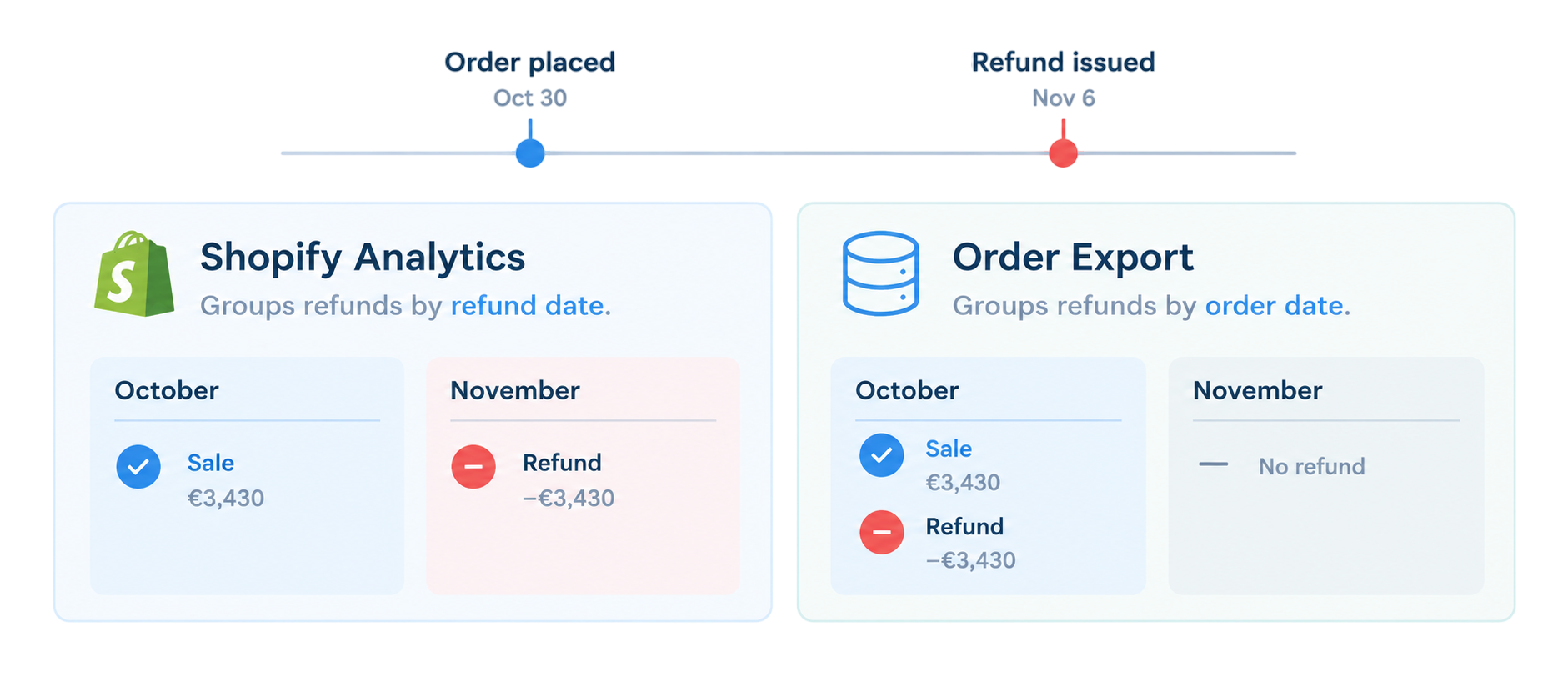
A simple example illustrates the problem. Imagine a customer places an order on October 30 and returns part of it on November 6. Shopify Analytics records the refund in November because that's when it happened. The order export associates it with the original order in October. Compare those reports over the same reporting period and you'll get different totals. Neither report is wrong; they're just applying different rules.
The same thing happens with sales figures. Gross Sales, Net Sales, Total Sales and Payout all include different combinations of shipping, taxes, discounts and refunds. Unless everyone in the business is working from the same definition of "sales", reconciliation quickly becomes an exercise in figuring out which report was used rather than understanding what actually happened.
The first time someone notices the difference, they make a manual adjustment and move on. A month later they run into it again, but can't quite remember how they fixed it last time. Before long there's an Excel workbook full of extra columns, lookup formulas and manual corrections that nobody really trusts, yet everyone depends on to close the month.
As the business grows, the problem grows with it. A wholesale channel, a marketplace or a physical store each introduce another source of data and another set of reporting rules. Reconciling everything becomes more time-consuming because every system has its own interpretation of what should be counted, when it should be counted and how it should be reported.
None of this is really Shopify's fault. It's doing exactly what it was designed to do. The difficulty comes from using operational reports as the basis for financial reporting. Shopify's built-in reports are fixed. You can read the documentation to understand how they work, but you can't change the underlying calculations to match your own accounting policies.
That's where working directly from the Shopify API changes the conversation. Instead of starting with Shopify's reports, the Shopify Input plugin brings orders, line items, refunds, transactions and adjustments directly into an Apache Hop pipeline. From there, every business rule belongs to you. If refunds should be recognized on the refund date, that's a transform. If shipping shouldn't be treated as revenue, that's another transform. If taxes need to be excluded, the logic is visible, editable and documented inside the pipeline instead of hidden inside Shopify.
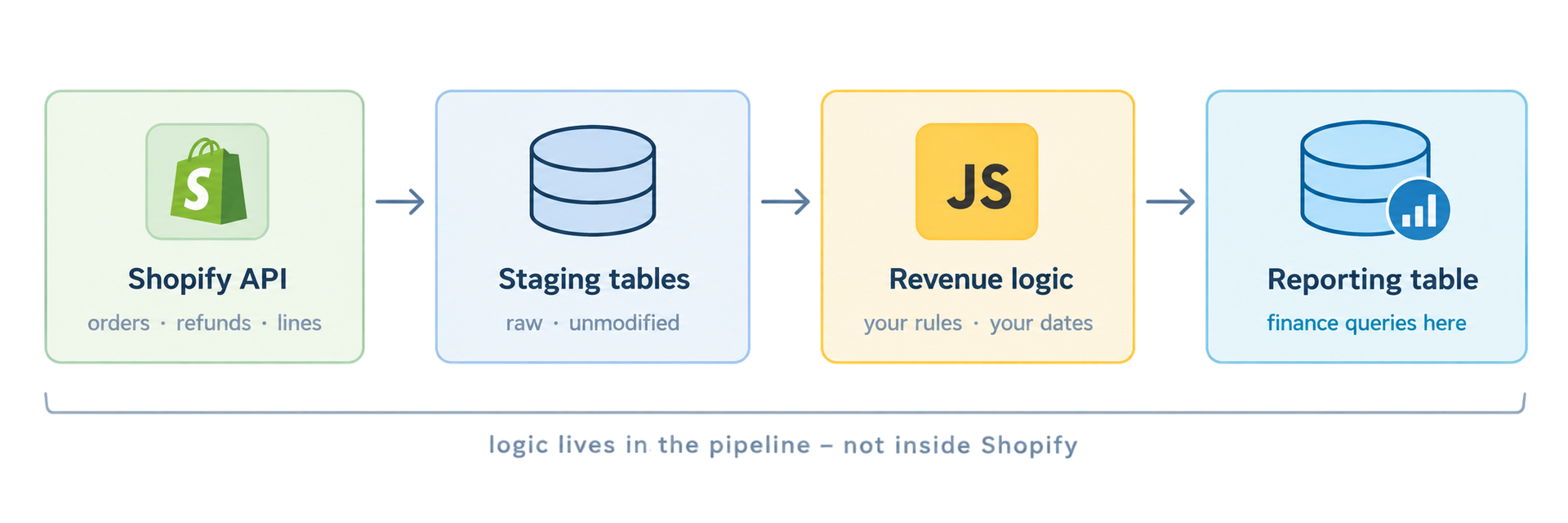
In practice, the pipeline loads orders into a staging table, joins refunds back to the original transactions and applies your own revenue recognition rules before writing the final results to a reporting table. The first time you compare those numbers with Shopify Analytics they probably won't match exactly, and that's perfectly normal. You're no longer reproducing Shopify's reporting logic; you're applying your own.
The important difference is that every number can now be explained. When Finance asks where a figure came from, you can follow it back through the pipeline, inspect every transformation and account for every adjustment. Instead of trying to reconcile reports that were built for different purposes, you're working from a process that's designed around the way your business actually reports revenue.
The Shopify Input plugin is included in all Putki tiers, and ready-to-use templates are available at putki.io/templates.