
Imagine your support queue is just one long list of text. Someone reports, "The pipeline crashed and data has been missing since 7 a.m." Right below it, someone asks how to reset a password. Both sit in the same queue until the next available agent picks one up.
Tools like Jira let you set priority manually, but self-reported priority is rarely reliable. Everyone thinks their issue is urgent. The result is a pile of tickets where everything is P2 and nothing actually is. Letting an LLM review incoming tickets and assign priority independently removes the bias from the person who opened it.
The fix isn't a better ticketing system. It's knowing which one needs immediate attention and which one can wait until tomorrow morning, without relying on the person filing the ticket to make that call.
Some teams trying to use LLMs in their data operations run into the same problem. Calling the model isn't difficult. The hard part is everything around it: getting the right data into the prompt, handling failures, routing the output, and making sure the next transform can actually use it. That's usually where projects get stuck.
Apache Hop has a Language Model Chat transform that connects directly to LLMs from inside a pipeline. Anthropic, Mistral, OpenAI, Ollama, Hugging Face, same transform, same interface. The model is a configuration detail. The pipeline is where the actual work happens.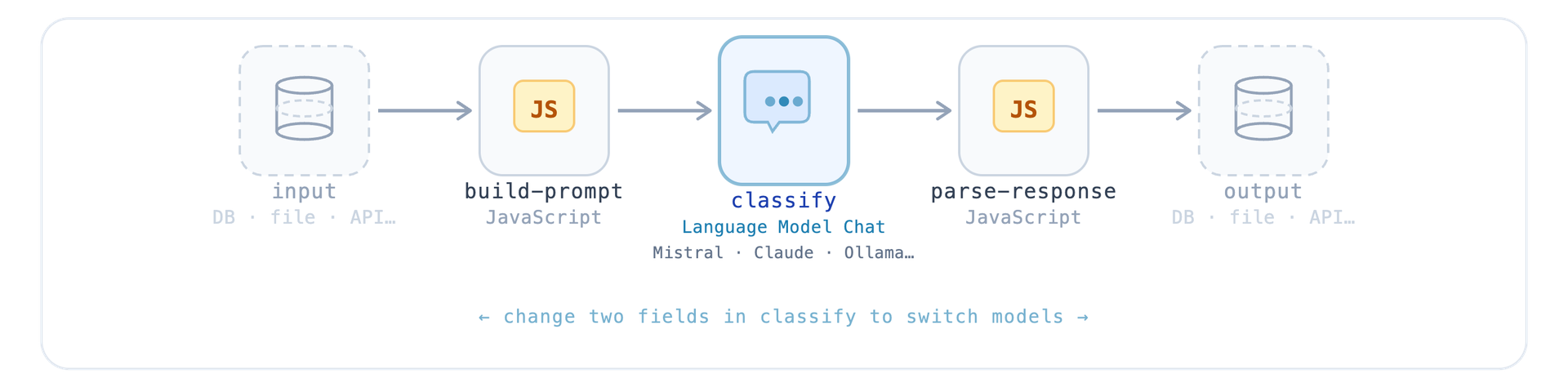
We built a support ticket classifier to see how far a simple pipeline could get.
Five tickets, plain text, no structure. The pipeline reads them, builds a prompt for each one, sends it to Mistral, and comes back with three fields: urgency, category, and a suggested action.
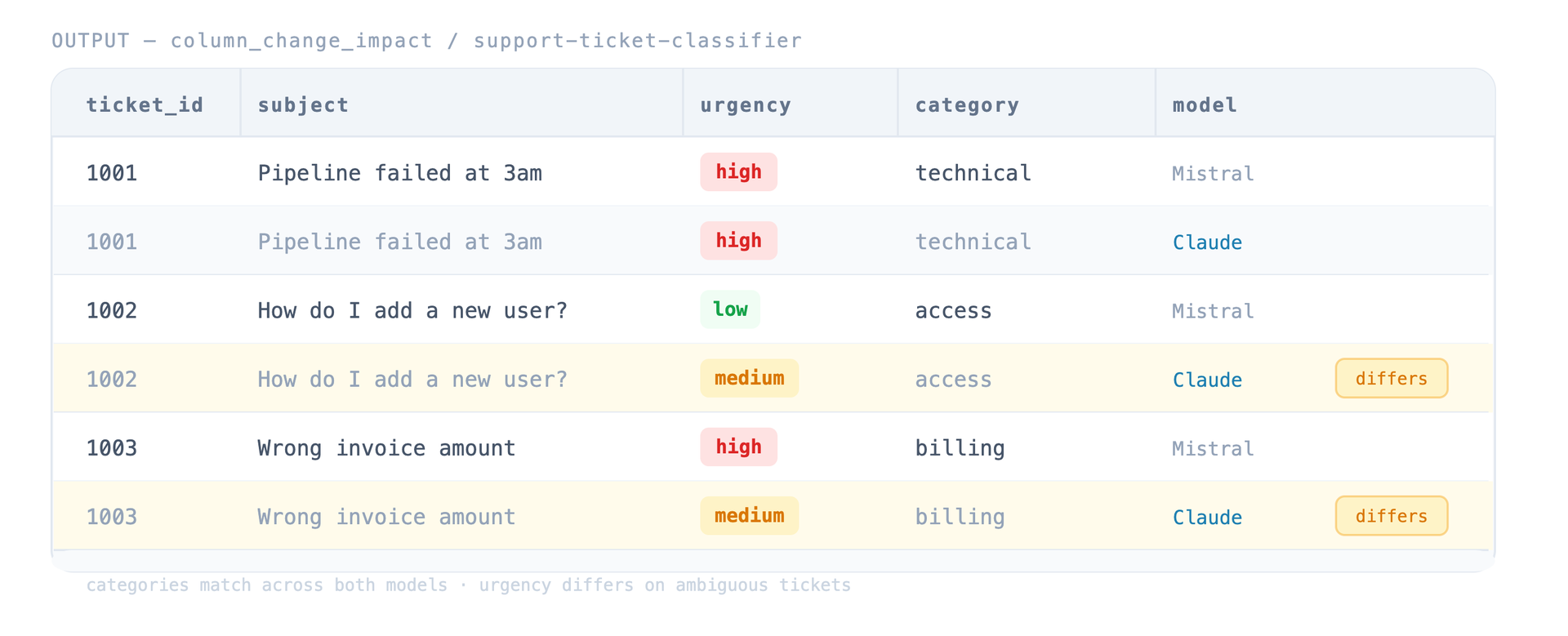 The classifications are correct, but that's not the interesting part. The real value is the structured output. Because urgency and category are structured fields, you can automatically route tickets to the right team, trigger an escalation for high-priority issues, or feed the results into a dashboard. The model turned unstructured text into something the rest of the pipeline can work with.
One thing worth mentioning: Mistral returned the JSON wrapped in markdown code fences despite being told not to. That's just what working with LLMs at scale looks like, the model doesn't always do exactly what the prompt says. The parse transform strips the markdown with a simple regex before reading the JSON. Small thing, but it's the difference between a demo and something you can actually run in production.
Switching from Mistral to another supported model only means changing two fields in the transform. The prompt stays the same, the parser stays the same, and everything downstream keeps working. The pipeline doesn't know which model is running, and honestly, it doesn't need to.
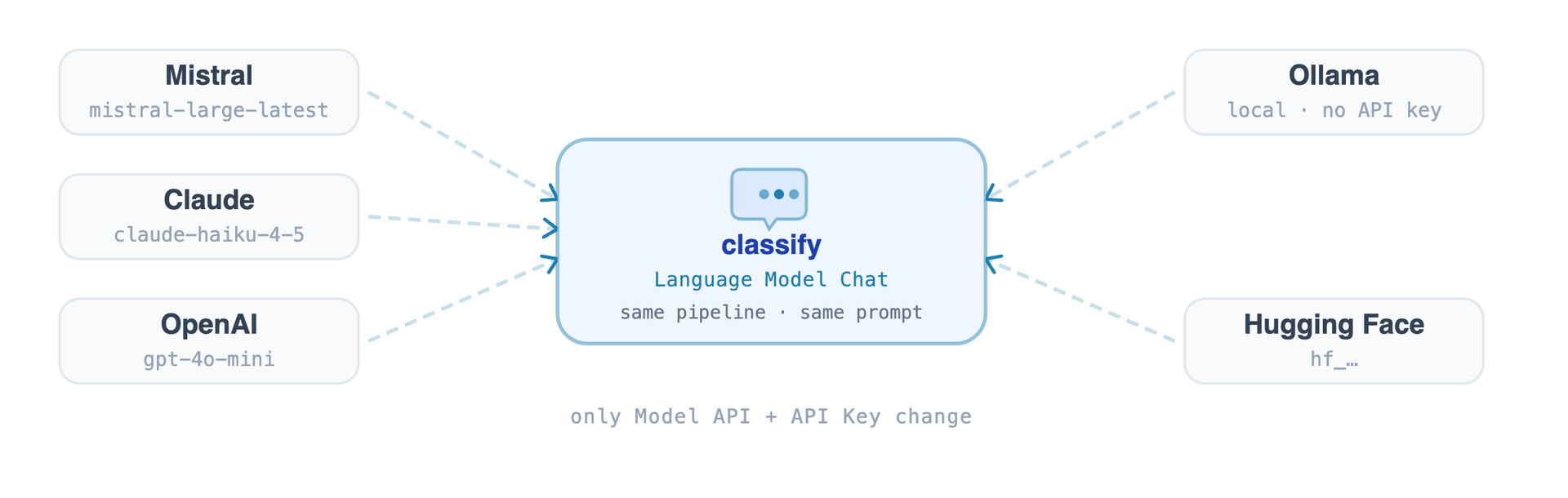
For teams with data sovereignty requirements, that flexibility matters. If you use Mistral, your requests stay on European infrastructure. If you run Ollama locally, they never leave your own network. Either way, the pipeline doesn't change.
Which model you use depends on a lot of factors and is subject to your organization's preferences, but in the entire process, it's nothing but a configuration detail and is easy to change. The real work is getting data into the right shape, handling imperfect responses, and making sure the output is useful to whatever comes next. That's where Apache Hop fits in. It connects all those pieces into a pipeline that keeps working regardless of which model you're using.