Icon

Usage
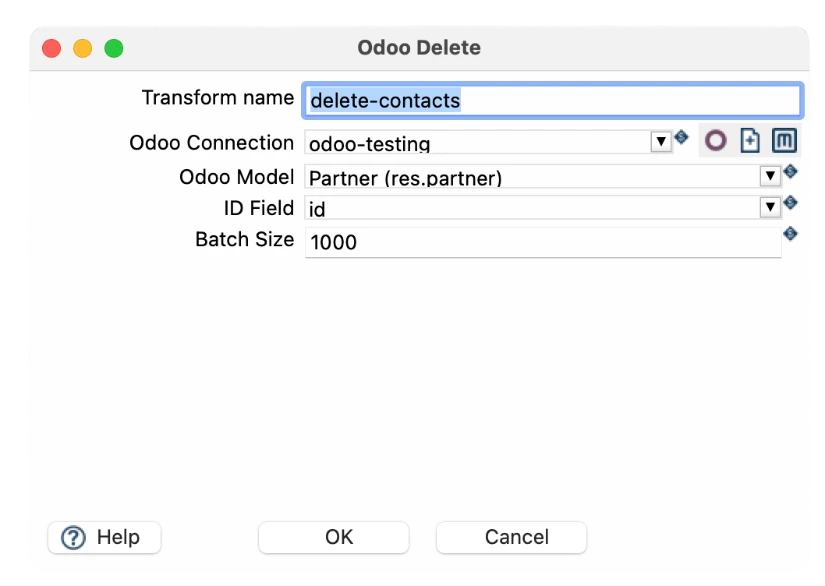
The Odoo Delete transform requires the following configuration settings:
Parameter | Description |
Transform name | A unique identifier for this transform in your pipeline (e.g., "delete-contacts") |
Odoo Connection | The configured Odoo connection to target (e.g., "odoo-testing"). This defines which Odoo instance receives the delete commands. |
Odoo Model | The target model/object in Odoo to delete from (e.g., "Partner (res.partner)", "Contact", "Customer"). Uses the internal model name. |
ID Field | The field name containing the unique identifier for records to delete (typically "id", but can be any unique field like "external_id") |
Batch Size | Number of records to delete in each batch (e.g., 1000). Larger batches are faster but consume more resources. Recommended: 500-2000 depending on system load. Specify 0 for no limit. |
Connection configuration
Before using the transform, you must define an Odoo database connection. The fields required are:

Field | Required | Description |
Odoo connection name | Yes | A descriptive name for the connection in Hop. |
Base URL (domain) | Yes | Full URL of the Odoo instance, e.g., https://mycompany.odoo.com. |
Username | Yes | Odoo username for authentication (or API user). |
Password | Yes | Odoo password or API key, depending on authentication method. |
Database | Yes | Name of the Odoo database to query. |
Practical examples
Example 1: Delete test contacts before production
Scenario: Your team created test partner/contact records during development, and you need to clean them up before going live.
Configuration:
Setting | Value |
Transform name | clean_test_contacts |
Odoo Connection | odoo-production |
Odoo Model | Partner (res.partner) |
ID Field | id |
Batch Size | 0 |
Input data: A CSV or database source containing IDs of test contacts (e.g., ID 234, 235, 236, etc.)
Result: All test contacts are permanently removed from Odoo, and your database is clean for production.
Example 2: GDPR compliance - Delete customer records on request
Scenario: Your organization receives a "right to be forgotten" request under GDPR. You need to delete all data associated with specific customers.
Steps:
Receive deletion requests from a CSV file containing customer IDs and emails
Pass IDs through the Odoo Delete transform targeting the Partner (res.partner) model
Log the deletion action to an audit trail for compliance documentation
Configuration:
Setting | Value |
Transform name | gdpr_delete_customers |
Odoo Connection | odoo-production |
Odoo Model | Partner (res.partner) |
ID Field | id |
Batch Size | 100 |
Example 3: Automated Cleanup of Inactive Records
Scenario: Every quarter, you want to automatically delete contact records that have not had any activity in the past 2 years, keeping your database lean and performant.
Steps:
Query Odoo database for all contacts with last_activity_date older than 2 years
Filter and select the IDs of inactive contacts
Feed those IDs into the Odoo Delete transform
Schedule the workflow to run automatically via Apache Hop scheduling
Configuration:
Setting | Value |
Transform name | cleanup_inactive |
Odoo Connection | odoo-production |
Odoo Model | Partner (res.partner) |
ID Field | id |
Batch Size | 1000 |