Icon

Usage
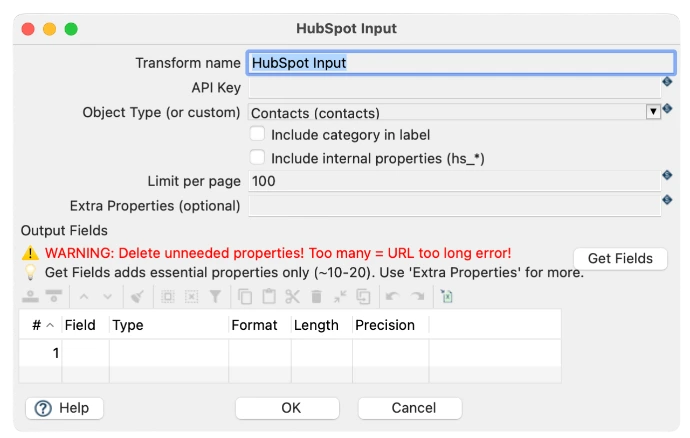
Core configuration parameters
These essential parameters are required to connect and extract data from HubSpot:
Transform Name: Unique identifier for this transform (e.g., "read-hubspot-contacts"). Used for logging and referencing.
API Key: HubSpot API key for authentication. Obtain from HubSpot Settings > Integrations > API Keys. Supports environment variables like ${HUBSPOT_API_KEY}.
Object Type (or custom): Type of HubSpot object to extract: Contacts (contacts), Companies (companies), Deals (deals), etc.
Limit per page: Number of records per API request (default: 100, max typically 100). Lower values = more API calls but less memory.
Configuration options
These optional settings control how data is extracted and returned:
Include category in label: Checkbox - includes category information in field labels (default: Unchecked)
Include internal properties (hs_*): Checkbox - extracts HubSpot internal properties (e.g., hs_lead_status, hs_analytics_num_page_views). Use cautiously as these can be numerous.
Extra Properties (optional): Text field - specify additional custom properties not included by default. Format: comma-separated property names (e.g., custom_field_1, custom_field_2)
HubSpot object types
The HubSpot Input transform can extract data from different HubSpot object types. Each has different available fields. For example:
Object Type 1: Contacts (contacts)
Extracts individual contact records from HubSpot. Most common object type for customer data synchronization.
Common Fields:
id - Unique HubSpot contact ID
firstname - Contact first name
lastname - Contact last name
email - Primary email address
phone - Primary phone number
mobilephone - Mobile phone number
address - Street address
city - City
zip - Postal code
country - Country
company - Company name
jobtitle - Job title
website - Website URL
createdAt - Creation date/time
updatedAt - Last updated date/time
Object Type 2: Companies (companies)
Extracts company records from HubSpot. Use when synchronizing company/organization data.
Common Fields:
id - Unique HubSpot company ID
name - Company name
address - Street address
city - City
website - Company website
country - Country
phone - Company phone number
industry - Industry classification
numberofemployees - Employee count
annualrevenue - Annual revenue
createdAt - Creation date
updatedAt - Last updated date
Object Type 3: Deals (deals)
Extracts deal/opportunity records from HubSpot. Use for sales pipeline synchronization.
Common Fields:
id - Unique HubSpot deal ID
dealname - Deal name
dealstage - Current pipeline stage
amount - Deal amount/value
closedate - Expected close date
dealowner - Deal owner user name
createdAt - Deal creation date
updatedAt - Last update date
Output fields configuration
After clicking "Get Fields", HubSpot Input displays available fields. You can customize which fields to extract:
Field management:
Get Fields - Automatically populates essential fields (~10-20) only. Recommended starting point.
Add Fields - Use "Extra Properties" text field to add custom or additional HubSpot properties.
Delete Fields - Remove unneeded fields to reduce API response size and avoid "URL too long" errors.
Rename Fields - Customize output field names for better readability downstream.
Field types:
String: Text data (names, emails, URLs, etc.)
Date: Date values with format specification (e.g., yyyy-MM-dd'T'HH:mm:ss.SSS'Z')
Integer: Whole numbers (IDs, counts)
Boolean: True/False values
Practical examples
Example 1: Basic Contact Extraction
Scenario: Export all HubSpot contacts to sync with Odoo CRM.
Configuration:
Transform Name: read-hubspot-contacts
Object Type: Contacts (contacts)
API Key: ${HUBSPOT_API_KEY}
Limit per page: 100
Include internal properties: Unchecked
Extra Properties: (empty)
Get Fields: Click to extract ~20 essential contact fields
Output: Extracts firstname, lastname, email, phone, company, address, city, zip, etc. for all HubSpot contacts.
Example 2: Contact Extraction with Custom Fields
Scenario: Export contacts with custom HubSpot properties like customer_type and annual_contract_value.
Configuration:
Transform Name: read-hubspot-contacts-custom
Object Type: Contacts (contacts)
Extra Properties: customer_type,annual_contract_value,industry_segment
Get Fields: Click first
Then add custom properties above
Example 3: Company Data Extraction
Scenario: Extract company records from HubSpot to sync with Odoo companies.
Configuration:
Transform Name: read-hubspot-companies
Object Type: Companies (companies)
Limit per page: 100
Get Fields: Click to extract company-specific fields