
Import relational data to Neo4j using Apache Hop Neo4j Output
Last updated: February 12, 2026
This article explains how to export data from a relational database (PostgreSQL) and import it into a Neo4j graph database using the Neo4j Output transform in Apache Hop.
Prerequisites: Basic understanding of the property graph model, a working Apache Hop installation, and access to both a PostgreSQL and Neo4j instance.
Related article: Importing Relational Data to Neo4j using Apache Hop — Graph Output, which uses the Neo4j Graph Output plugin with a metadata-defined graph model. Graph Output loads only nodes that have at least one relationship, while Neo4j Output loads all nodes.
Source code: Available in the how-to-apache-hop public repository.
Overview
The Neo4j Output approach uses separate pipelines for nodes and relationships, orchestrated by workflows. The process has four steps:
Design the graph model — Translate the relational schema into a graph data model.
Implement node pipelines — One pipeline per node label.
Implement relationship pipelines — One pipeline per relationship type.
Implement workflows — Orchestrate execution in the correct order (nodes first, then relationships).
Sample database
This tutorial uses the dvdrental sample PostgreSQL database, which represents the business processes of a DVD rental store: films, actors, categories, languages, and staff.
Only a subset of entities is used to keep the graph focused on the most relevant relationships.
Step 1: Design the graph model
When converting a relational model to a graph model, follow three standard rules:
Relational concept | Graph concept |
Row | Node |
Table name | Label |
Join / foreign key | Relationship |
Nodes and labels
Relational table | Graph label |
Actor | Actor |
Film | Film |
Category | Category |
Language | Language |
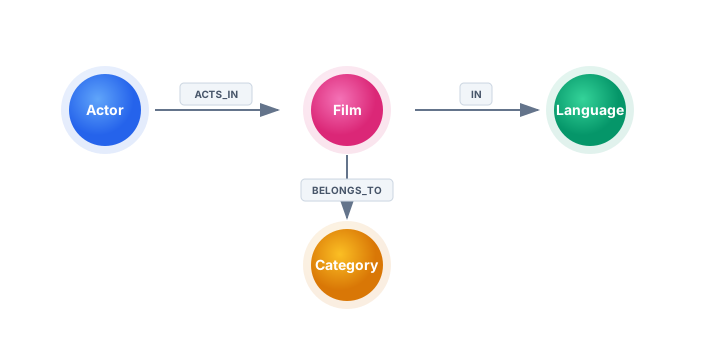
Relationships
Join | Relationship name | Source → Target |
Actor ↔ Film (via film_actor) | ACTS_IN | Actor → Film |
Film ↔ Category (via film_category) | BELONGS_TO | Film → Category |
Film ↔ Language | IN | Film → Language |
The resulting graph model:
Pipeline and workflow structure
Unlike Graph Output (which can load nodes and relationships in a single pipeline), Neo4j Output requires separate pipelines organized into workflows:
main-workflow
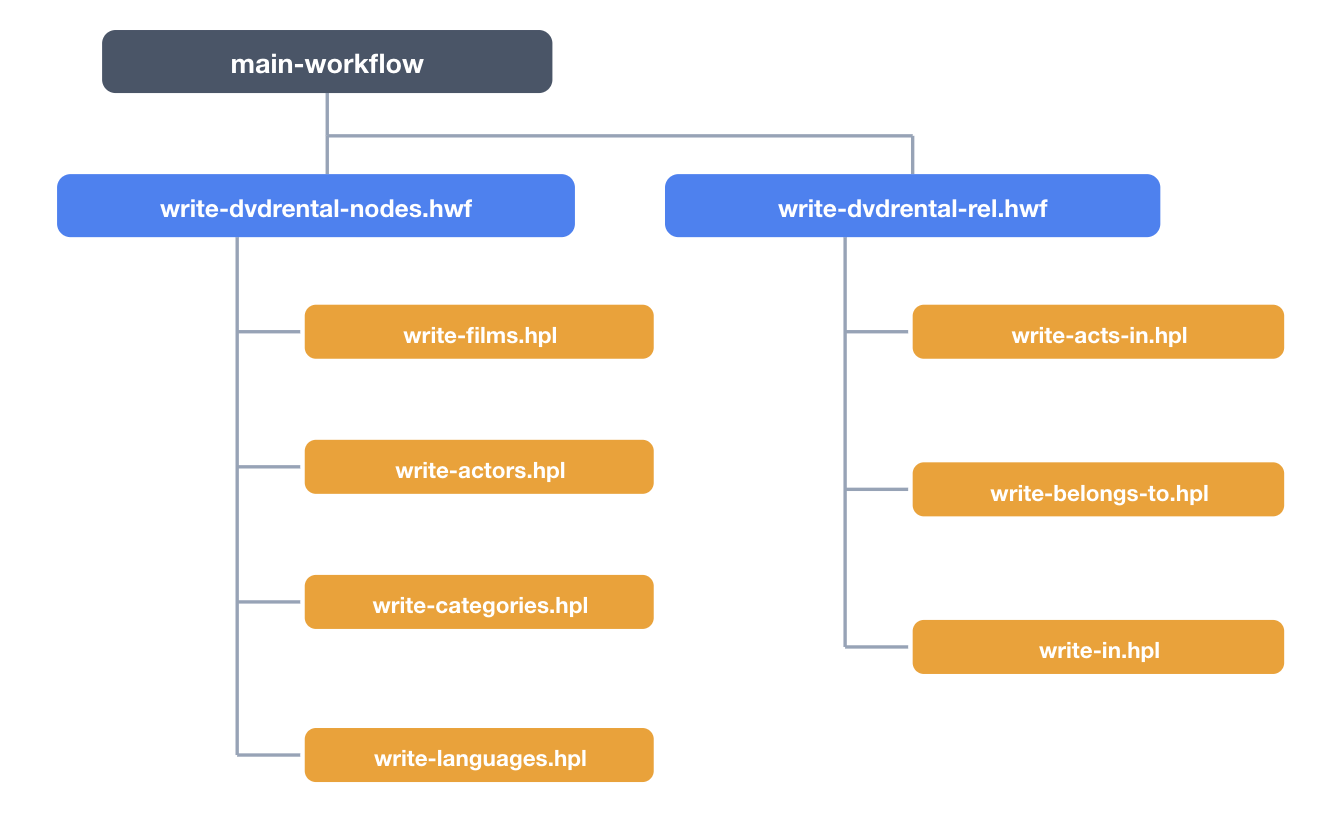
Nodes must be loaded before relationships, since relationships reference existing nodes by their primary keys.
Step 2: Implement node pipelines
Each node pipeline follows the same pattern: Table Input → Neo4j Output.
Example: Film nodes
Table Input SQL:
sql
Neo4j Output configuration:
Setting | Value |
Transform name | write-films |
Neo4j Connection | neo4j-connection |
Batch size | 1000 |
Create indexes | Yes |
Use CREATE instead of MERGE | Yes |
The label is set to Film and all fields from the Table Input are mapped as node properties. The film_id field is marked as the primary key.
Key settings explained:
Batch size: Aggregates 1,000 records per transaction for better performance.
Create indexes: Generates unique constraints for all primary key properties.
Use CREATE instead of MERGE: Bypasses lookup for faster loading. Use this for initial loads when you are certain no duplicates exist.
Result: 1,000 Film nodes created.
Repeat for remaining node types
Create identical pipelines for the other three node labels:
Pipeline | SQL source | Label | Primary key | Nodes created |
write-films.hpl | public.film | Film | film_id | 1,000 |
write-actors.hpl | public.actor | Actor | actor_id | 200 |
write-categories.hpl | public.category | Category | category_id | 16 |
write-languages.hpl | public.language | Language | language_id | 16 |
Verification queries
cypher
Step 3: Implement relationship pipelines
Each relationship pipeline also uses Table Input → Neo4j Output, but with the Only create relationships option enabled. The Neo4j Output transform is configured with three tabs: From Node, To Node, and Relationship.
Example: ACTS_IN relationship
Table Input SQL:
sql
The film_actor table contains actor_id, film_id, and last_update — the join table that represents the many-to-many relationship.
Neo4j Output configuration:
Setting | Value |
Transform name | write-acts-in |
Neo4j Connection | neo4j-connection |
Batch size | 1000 |
Only create relationships | Yes |
From Node tab:
Setting | Value |
Label | Actor |
Property field | actor_id |
Property name | actorId |
Primary | Yes |
To Node tab:
Setting | Value |
Label | Film |
Property field | film_id |
Property name | filmId |
Primary | Yes |
Relationship tab:
Setting | Value |
Relationship value | ACTS_IN |
Relationship property field | last_update |
Relationship property name | lastUpdate |
Property type | LocalDateTime |
Result: 5,462 ACTS_IN relationships created.
Repeat for remaining relationship types
Pipeline | SQL source | Relationship | From → To | Created |
write-acts-in.hpl | public.film_actor | ACTS_IN | Actor → Film | 5,462 |
write-belongs-to.hpl | public.film_category | BELONGS_TO | Film → Category | 1,000 |
write-in.hpl | public.film | IN | Film → Language | 1,000 |
Verification queries
cypher
Step 4: Implement the workflows
Nodes workflow
Create a workflow that chains all node pipelines sequentially:

For each action, browse to the pipeline file. Enable Wait for the pipeline to complete.
Relationships workflow
Create a workflow that chains all relationship pipelines:

Main workflow
Create a main workflow that runs the two sub-workflows in order:

This ensures nodes and indexes exist before relationships are created.
Verifying the result
After the main workflow completes, verify the graph in Neo4j.
View the graph schema:
cypher
View sample data with relationships:
cypher
Neo4j Output vs. Graph Output
Aspect | Neo4j Output | Graph Output |
Graph model metadata | Not required | Required (metadata object) |
Pipeline structure | Separate pipelines for nodes and relationships | Single pipeline for everything |
Node loading | Loads all nodes, including those without relationships | Loads only nodes that appear in the join result |
Workflow orchestration | Required (nodes before relationships) | Not required |
Flexibility | More granular control per node/relationship type | More compact, single-pass approach |
Best for | Full data loads, complex graphs with many node types | Simpler models, faster setup |
Choose Neo4j Output when you need to load all nodes regardless of relationships, or when you want granular control over each node type and relationship pipeline. Choose Graph Output when you prefer a single-pipeline approach with metadata-driven mapping.