
Data lineage in Apache Hop
Last updated: February 11, 2026
Data lineage is the ability to track data as it moves through its lifecycle, from source systems, through transformations, and into final destination systems such as data warehouses, marts, or analytics layers. It provides a clear, traceable path that answers critical questions like:
Where did this data come from?
What transformations has it gone through?
Where is it used downstream?
What will break if I change this field or table?
In modern data platforms, end-to-end traceability is crucial for:
Audits and compliance (GDPR, HIPAA, SOX, etc.)
Debugging data quality issues
Root cause analysis
Impact analysis prior to changes
Data governance and certification
Trust in analytics and reporting
Apache Hop (Hop Orchestration Platform) is used to design, execute, and manage data pipelines and workflows. Although Apache Hop does not include a dedicated lineage visualization plugin, it provides all the building blocks needed to design, extract, and automate comprehensive data lineage using its metadata-first architecture.
Important clarification: No dedicated lineage plugin
It’s critical to understand:
Apache Hop does NOT have a dedicated “data lineage” plugin or built-in lineage visualization tool (like some commercial ETL platforms).
However, Apache Hop does support lineage implicitly through:
Built-in metadata structures (XML/JSON)
Detailed pipeline and workflow definitions
Dependency tracking
Impact analysis features
Hop Metadata Provider framework
Relationship between objects (transforms, connections, schemas, files, etc.)
These elements provide all the components required to create a complete lineage framework using scripts, reports, or integration with external lineage tools.
How data lineage works in Apache Hop
Apache Hop creates implicit lineage graphs through the way pipelines and workflows are defined.
Key objects in the lineage graph
Object | Role in lineage |
Pipeline (.hpl) | Defines data flow and transformations |
Workflow (.hwf) | Orchestrates pipelines and processes |
Transform | Individual data operation (select, join, filter, load) |
Hop (connection) | Data flow line between transforms |
Metadata Objects | Databases, files, schemas, environments |
Projects & Environments | Logical grouping and configuration |
Each transform may read from:
A database table
A file (CSV/JSON/Parquet)
An API
A stream
And write to:
A table
A message bus
A file
A BI layer
Together they form a traceable data path.
Conceptual lineage flow
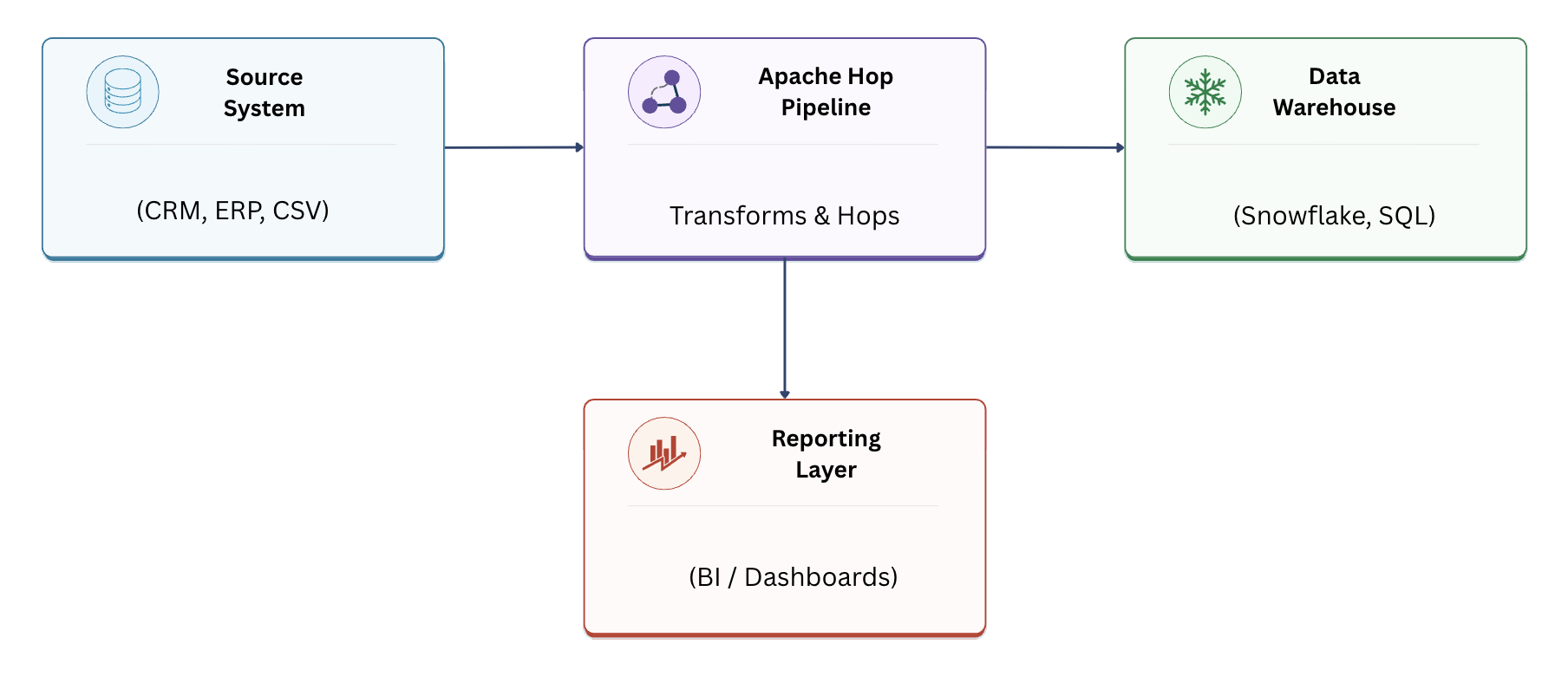
Lineage tree example:
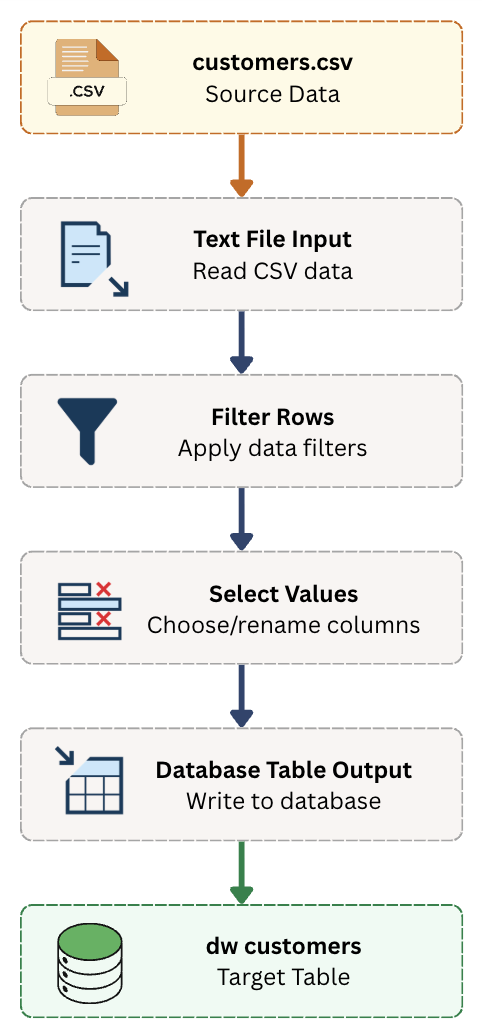
Built-in lineage & impact analysis capabilities
Apache Hop provides internal support for understanding dependencies, even if not visually rendered:
Built-in capabilities
Dependency analysis
Parent/child object relationships
Field-level tracking inside transforms
Table and schema references
Pipeline and workflow dependency discovery
What this enables
These native structures support:
Compliance validation
Change impact analysis
Root cause analysis
Regulatory audit requirements
Downstream consumer identification
For example, changing a source table field in a Text File Input or Table Input can be traced to:
Which pipelines use that field
Which reports rely on that output
Which workflows depend on this pipeline
Lineage extraction techniques
Since Hop does not provide a button-click GUI for lineage, extraction is done programmatically.
Method 1: Parsing XML / JSON definitions
Hop pipelines and workflows are stored as files:
.hpl for pipelines
.hwf for workflows
They contain information about:
Connections
Tables
Fields
Inputs and outputs
Transform logic
Example XML snippet:
<transform>
<name>Read Customers</name>
<type>TableInput</type>
<connection>CRM_DB</connection>
<sql>SELECT * FROM customers</sql>
</transform>
<transform>
<name>Load DW</name>
<type>TableOutput</type>
<connection>DWH</connection>
<table>dw_customers</table>
</transform>
This alone provides:
CRM_DB.customers ---> dw_customers
Method 2: Python / Java script parsing
You can write a script to parse .hpl and .hwf metadata:
Python pseudo-code idea:
import xml.etree.ElementTree as ET
tree = ET.parse("customer_pipeline.hpl")
root = tree.getroot()
for transform in root.iter("transform"):
name = transform.find("name").text
ttype = transform.find("type").text
if ttype == "TableInput":
print("SOURCE:", transform.find("sql").text)
if ttype == "TableOutput":
print("TARGET:", transform.find("table").text)
This can be used to automatically generate:
CSV lineage reports
Graph visualizations (Graphviz, Mermaid)
Database lineage tables
Example scenario (End-to-end)
Business goal
Move customer data from CRM to the Data Warehouse for reporting.
Source
crm.customers
Hop pipeline
Table Input: crm.customers
Filter: active customers only
Select: specific columns
Table Output: dw_customers
Target
warehouse.dw_customers
Downstream
Power BI Dashboard: Sales by Customer
Lineage report output
Source | Transformation | Target | Consumer |
crm.customers | Filter active customers | dw_customers | Sales dashboard |
crm.customers.email | Mask email | dw_customers.email_masked | BI reports |
This satisfies:
Audit requirement
Field-level traceability
Usage awareness
Benefits of using Apache Hop for data lineage
Centralized metadata control
Clear transformation logic
Easy integration into governance platforms
Automated documentation
Transparency and trust
Faster troubleshooting
Improved impact visibility
Lower compliance risk
Challenges and limitations
Challenge | Description |
No visual lineage graph | Must be built or integrated |
Requires scripting | For full automation |
Complex pipelines | Harder to map manually |
Field-level lineage | Needs deeper parsing |
Dynamic SQL | More difficult to trace |
These can be mitigated via standards and automation.
Best practices
Use strict naming conventions (source, staging, target)
Enforce metadata standards
Version control all pipelines/workflows (Git)
Write human-readable transformation descriptions
Use standard input/output patterns
Automate lineage scan jobs
Store lineage output in a queryable database
Create governance tags in metadata
Maintain a mapping catalog
Step-by-step lineage extraction sample
Get all .hpl files from the Hop project
Parse each file for:
Table Input
Table Output
File Input
Kafka / API transforms
Extract:
Source system
Source object
Target system
Target object
Transform name
Store results in CSV or database
Use graph tool to visualize lineage
Schedule this script daily/weekly
Frequently Asked Questions (FAQ)
Q: Does Apache Hop support real-time lineage?
No, but it can be integrated with tools like OpenLineage for near real-time tracking.
Q: Can I see visual lineage in Hop GUI?
Not natively. Visualization must be external.
Q: Is field-level lineage possible?
Yes, by parsing transform fields in pipeline metadata.
Q: Is Apache Hop suitable for regulated environments?
Yes, when supported with governance and metadata best practices.
Conclusion
While Apache Hop does not provide a dedicated data lineage plugin, it delivers all the essential building blocks for implementing robust, enterprise-grade lineage:
Metadata-driven design
Structured pipeline definitions
Dependency tracking
Extensive extensibility
Compatibility with external governance tools
With Apache Hop's metadata model and the right extraction pipeline, you can trace every field from source to destination, and answer audit questions before they become a problem.